
Who this is for
Anyone shipping samples to TikTok Shop creators. The pain shows up the moment outreach starts working: 50 requests a day pile up in TikTok Shop notifications, and you're approving blindly.
- Brand owners shipping samples to 50 to 500 creators per month.
- Marketing teams running parallel SKU launches with separate sample budgets.
- Agencies handling sample logistics for multiple client brands.
- Ops teams who need creator context (GMV, niche, audience) on every approval.
Why sample programs leak budget
When outreach is humming, sample requests pile up faster than you can read them. Three patterns burn the most budget.
- Samples go to the wrong people. Approving on gut feel means half of them go to creators who never post. That's inventory and shipping cost gone.
- Requests pile up with no system. Hundreds of requests landing in TikTok Shop notifications. No way to filter, sort, or batch-approve based on creator data.
- No follow-up, no content. A creator gets the sample and goes silent. Without a tracker, you don't know who needs a nudge to post.
How Sample Manager works
Three stages. Inbox in, decision, post tracking. Each request carries creator context so the decision isn't blind.
| Step | What you do | Outcome |
|---|---|---|
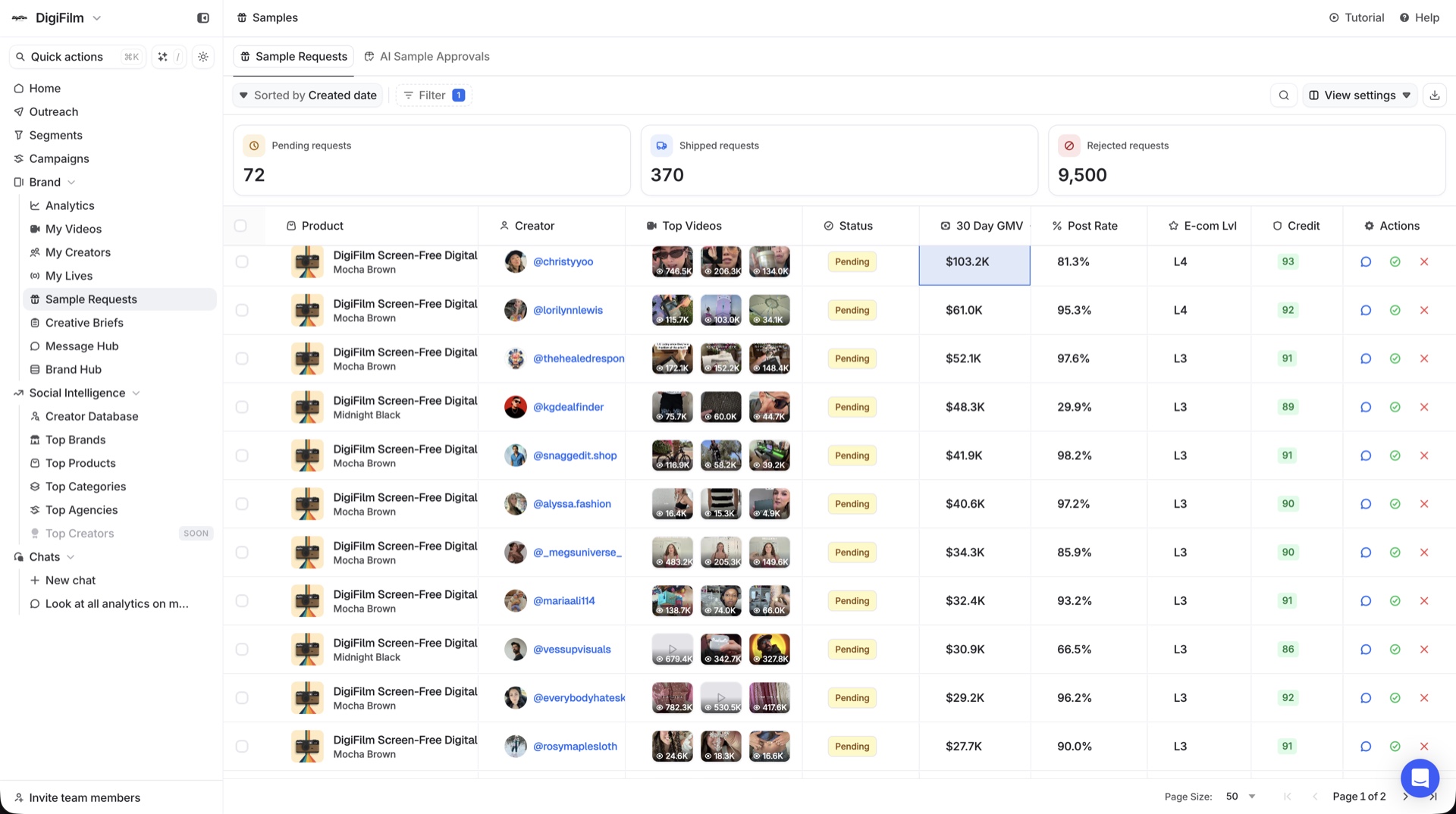
| 1. Requests come in | Creator sample requests from TikTok Shop land in one centralized dashboard with creator GMV, niche, and audience attached. | No more switching between TikTok Shop and your tools. Every request, every context, one inbox. |
| 2. Approve or decline | Review each request with the data you need. Approve with one click, decline politely, or queue for follow-up. | Sample budget goes to creators who actually move product, not whoever asked first. |
| 3. Track to the post | Sample Manager keeps tabs on shipment status and watches whether the creator posts the content they promised. | Closed loop from request to revenue. Spot creators who consistently don't post and stop sampling them. |
Talk to us
Want to see Sample Manager on real TikTok Shop data?
We'll walk through the approval inbox, the post tracker, and the segments that re-engage creators who went silent. No deck.
What you actually get
- Unified sample inbox. Every request in one place, with full creator context.
- Creator data on every request. GMV, niche, audience, prior posts. Approve with real signal.
- Shipment + post tracking. See where the sample is and whether the creator posted.
- Feeds Auto Responder and Sequences. Creators who got samples and didn't post can be re-engaged via a Segment.
- Works alongside Creator Lists. Sample VIPs, sample prospects, sample follow-ups all stay segmented.
How to get started
- Connect your TikTok Shop. Sample Manager pulls live affiliate requests into the dashboard.
- Set up approval criteria (minimum GMV, niche fit, audience size) so the inbox auto-sorts.
- Review and approve in batches. Most teams clear the day's requests in 10 minutes.
- Watch shipment + post status from the same dashboard.
- Segment sampled-but-never-posted creators into a re-engagement sequence.


